
Skip to content

v0.2.0 · Desktop app for macOS, Windows, Linux · Web viewer

The command center for AI coding agents

A desktop app that launches Claude Code, Codex, Cursor, Gemini CLI, and Aider — each in its own isolated worktree — and puts every session on one instrument panel: live status, context health, cost, and full history. Agents run locally on your machine. Review the diffs, ship what’s ready.

Private beta · Built in public


See it run

See every agent. Every session. Every decision.

Watch how Operon turns AI coding from a black box into a fully observable, controllable workflow.


The app itself

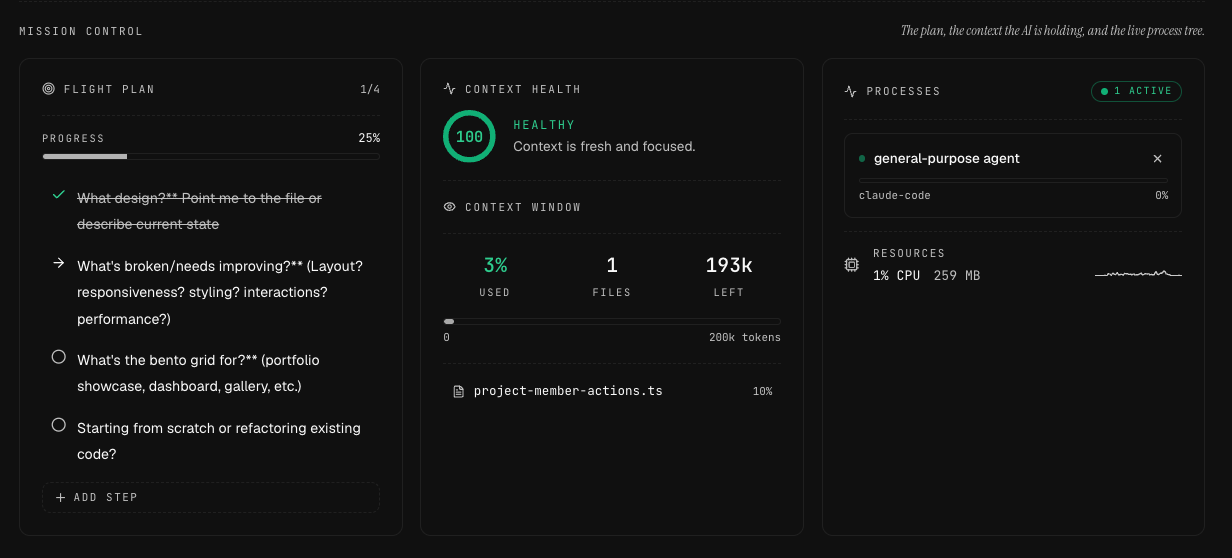
One command center, every view.

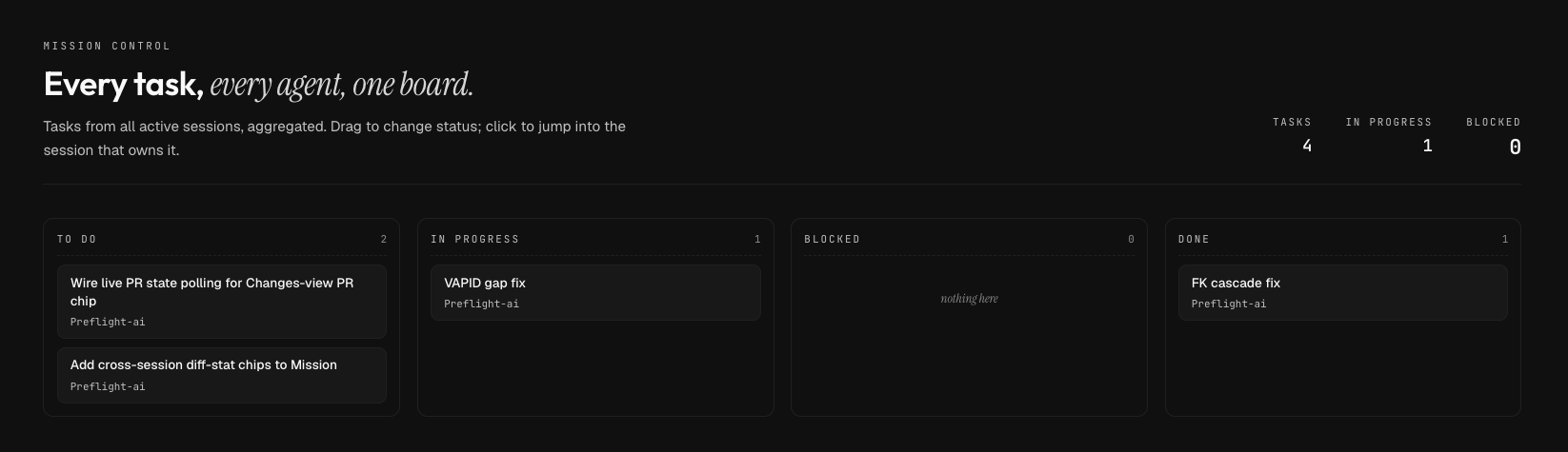
Operon's Mission Control view: every task from every active session aggregated onto one To Do / In Progress / Blocked / Done board.
  • Operon's Mission Control view: every task from every active session aggregated onto one To Do / In Progress / Blocked / Done board.
  • Operon’s Tasks board: tasks across active sessions laid out in columns with live status, assignees, and progress.
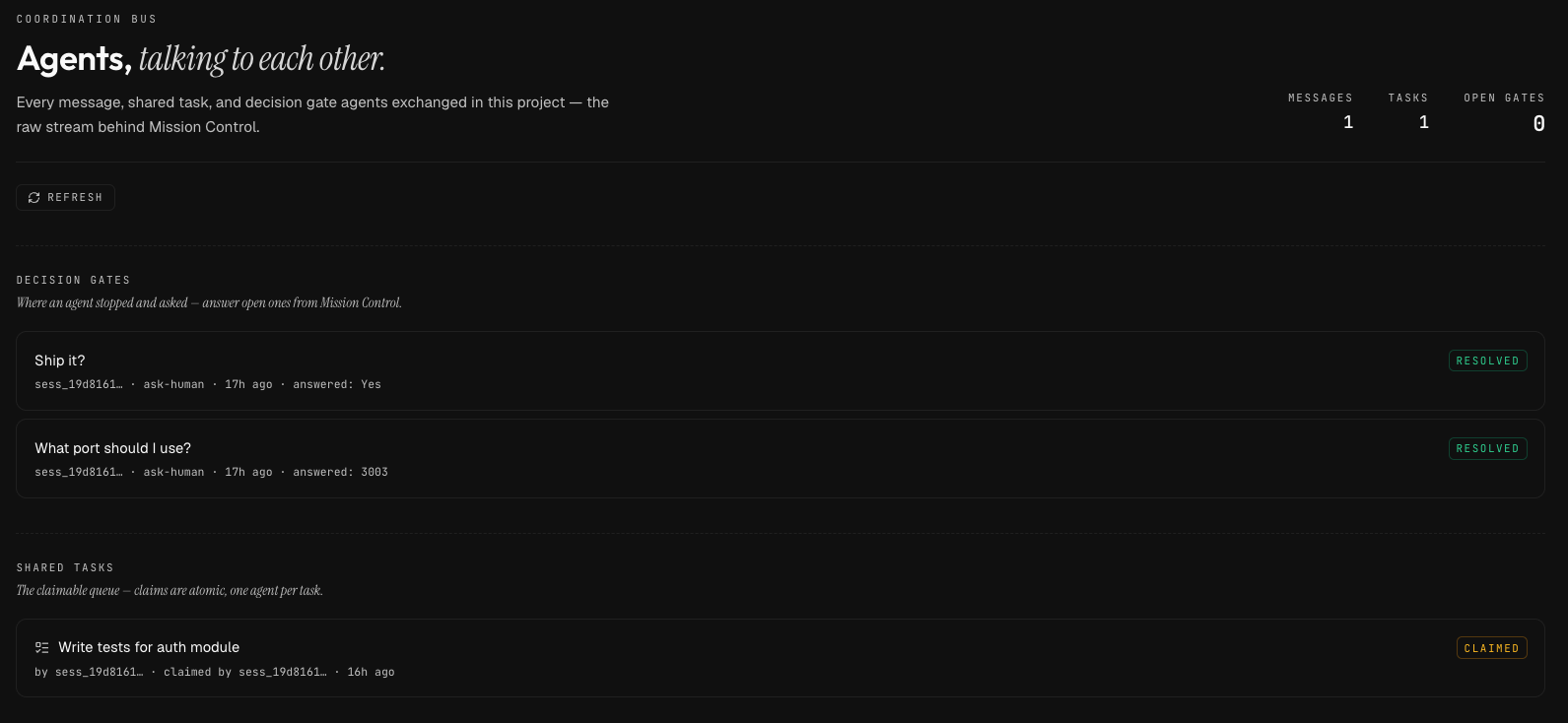
  • Operon’s Coordination Bus view: every message, shared task, and decision gate agents exchanged in a project, including resolved ask-human gates and claimable shared tasks.
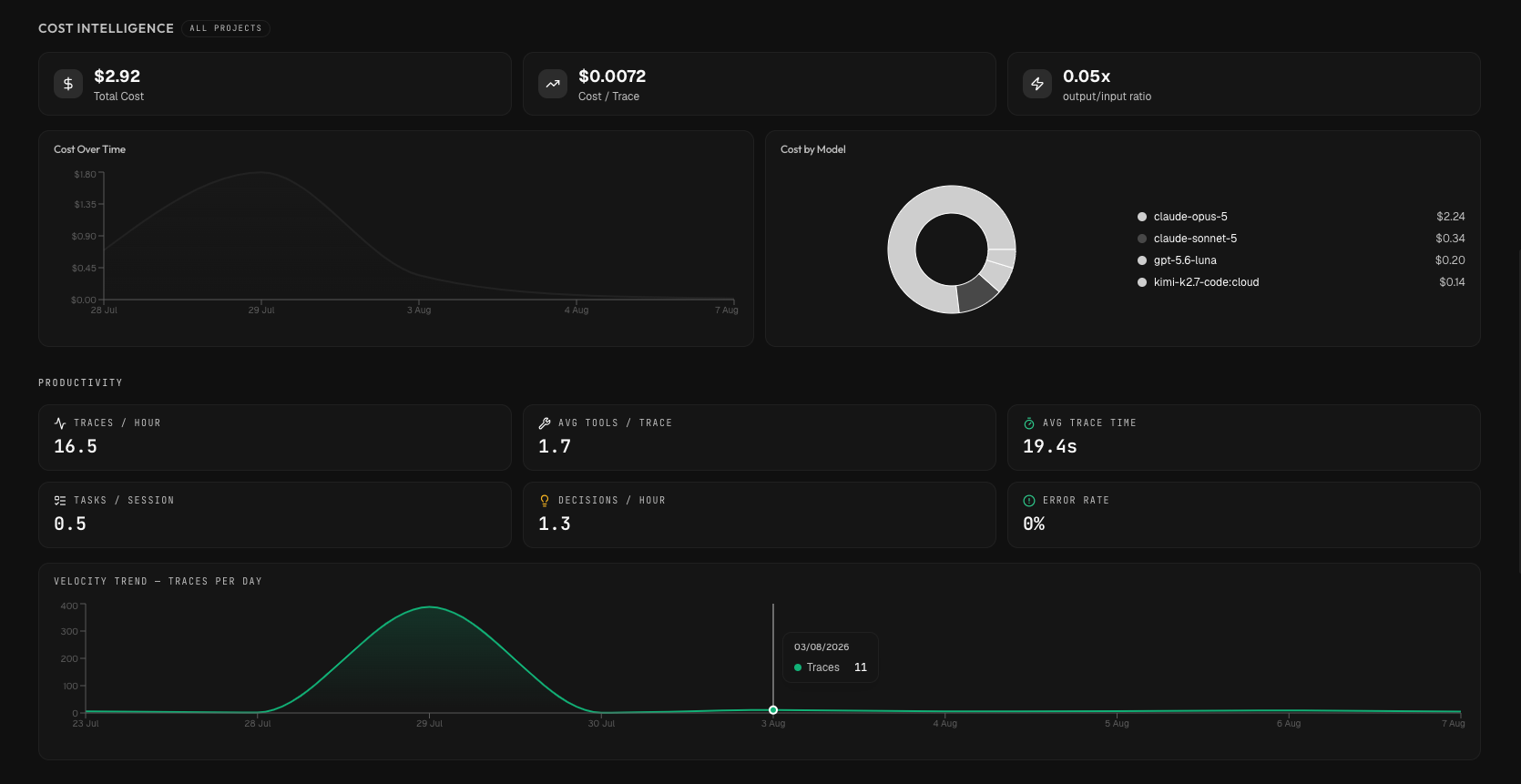
  • Operon’s Analytics view: cost intelligence, project breakdown, and spend per trace aggregated across every project, so you always know where time and tokens go.
  • Operon’s Session View tab bar: Overview, Terminal, Activity, Timeline, Tasks, Changes, Workflow, Preview, Analytics, Memory, Rollback, Checkpoints, Scope, and Intent — every tool for one session in a single view.

Product tour

See it work. Tab through the fleet.

Seven of the features developers reach for most — each a live demo you can flip between without leaving the page.

  • Mission Control: Every session, one grid. Every active session on a single grid, live. A needs-attention queue surfaces what is waiting on you first — oldest waiter, not loudest — so nothing stalls unnoticed.
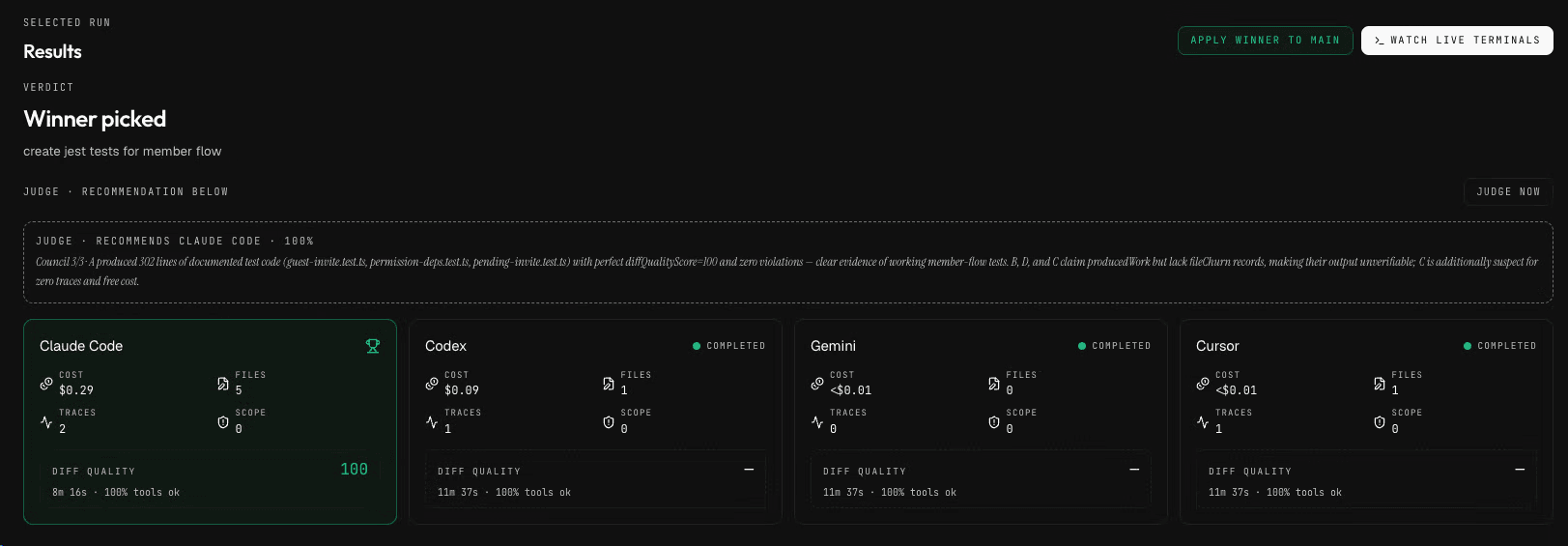
  • Arena: Same goal, judged. Run the same goal across 2–4 agents in parallel, each in its own worktree. Operon judges them on real data — cost, diff quality, scope — and you pick the winner.
  • Orchestration: Goals into a plan. Turn a one-line goal into a subtask DAG with per-step tool recommendations. Operon advances the plan as sessions finish and shows you exactly where it stands.
  • Visual Editor: A full IDE, in-session. A full-pane Monaco editor drops over any session — file tree, tabs, live search, and a diff view of what the agent changed. Edit alongside it, save, and Operon reconciles the file the moment it changes on disk.
  • Automation: Cron, triggers, no babysitting. Cron schedules or trigger events kick off a run through a pluggable action registry. Every inbound webhook is signature-verified, every automation gets a dry-run preview and its own status.
  • Governance: Guardrails, budgets, audit trail. Set spend budgets and scope policies once — agents run inside them automatically. A CFO-legible weekly digest and a full audit log mean every approval, override, and dollar is attributable.
  • Integrations: Jira, GitHub, Linear — one schema. Jira, GitHub, and Linear import into one shared issue schema, with per-source failure isolation so one bad connection never blocks the rest. Seed a session with the full issue and acceptance criteria, then open a real PR when it is done.
  • Preview: Click an element, jump to code. A live preview pane runs alongside the session. Click any element to jump straight to the file and line that renders it, and watch the app update as the agent edits.

One command center for the whole fleet.

Every active session on a single grid, live. A needs-attention queue surfaces what is waiting on you first — oldest waiter, not loudest — so nothing stalls unnoticed.

  • Live status for every agent, all at once
  • Needs-attention queue orders by who is waiting longest
  • Jump straight into any session that needs you
  • Monitor from desktop, tablet, or phone

Works with what you already use

Operon doesn't replace your AI coding tool. It wraps it.

Wraps

Claude CodeCursor
Codex
Gemini CLI
Aider

Connects

Linear
GitHub
GitLab
Jira
MCP Hub
Skills
Webhooks

The problem

AI coding tools give you a chat box. You need an instrument panel.

Context silently vanishes

Files drop out of the window mid-session. You only notice when the AI starts hallucinating about code it can no longer see.

Plans derail silently

One tangent and the original goal is gone. No anchor, no visible plan, no way to say stop — go back to step 3 and resume from there.

Agent touches files it shouldn't

You asked for an auth change. By the time you notice, the AI is 12 files deep into payment logic.

Decisions evaporate

Why did we reject Redux here? Three weeks later nobody — including the AI — remembers. No searchable archive, no rationale store.

Teams are blind to each other

No shared view, no cost visibility across the team, no way for a tech lead to observe or course-correct without interrupting.

Read all ten — long form →


In depth

Command, see, and control — up close.

Command

Run a fleet, not one session

One agent, one terminal. Everything else waits its turn.

Launch many agents in parallel, each in its own isolated worktree. Judge the same goal across several with Arena — pick the winner, the rest are reclaimed.

  • · Isolated worktrees, no conflicts
  • · Arena — judged, not guessed
  • · Mission Control fleet grid
See the fleet in action →

See

Every session, every instrument

AI sessions are black boxes. You see the diff, not the journey.

Live token gauge, file relevance scoring, cost trend, full event timeline — the credibility floor beneath the fleet.

  • · Real-time token + cost tracking
  • · File relevance + drop alerts
  • · Block-based trace timeline

Control

Define limits, catch drift

AI tools have no guardrails. One wrong edit cascades through your codebase.

Scope boundaries, checkpoint gates between steps, one-click rollback — plus a policy engine for team-wide rules.

  • · Scope boundary enforcement
  • · Checkpoint gates between steps
  • · Git-based one-click rollback

How it works

Four stages to full control

01

See

Full visibility — traces, tokens, timeline. Nothing hidden.

02

Control

Define scope. Checkpoint each step. Catch drift early.

03

Learn

Session DNA, pre-flight, failure patterns. Smarter every session.

04

Orchestrate

Decompose goals, route to the best tool. You direct, Operon executes.


The fleet

Many agents. One command center.

Build features, fix bugs, and refactor — all at once. Each agent isolated, all of them visible, one you judge on real data.

Isolated

Its own worktree, every time

No merge conflicts, no stepping on each other. Review and merge when you’re ready.

Mission Control

Every session, one grid

A needs-attention queue puts what’s waiting on you first — oldest waiter, not loudest.

Arena

Same goal, judged

2–4 agents work it in parallel. Judged on cost, diff quality, scope. You pick the winner.

Watch Arena judge a run →

Who it's for

Built for the developer. Observable by the whole team.

Solo developers get the full desktop app for $99 once. Teams add a web dashboard so leads, PMs, and clients can see what the AI is doing — without interrupting.

Your daily driver

Developer

Desktop App · Mac · Win · Linux

Persistent terminal that survives restarts. Live context monitor, flight plan, decision memory, scope guardrails, session replay. Any CLI agent, all your machines.

  • · Context monitor + flight plan
  • · Persistent terminal daemon
  • · Any CLI agent — 5 verified, more in beta
  • · Scope boundaries + checkpoint gates
Join the waitlistSolo Local · $99 once · 14-day trial

Observable by

Tech Lead

Web Dashboard

Session activity, cost per developer, decision archive, handoff summaries. Observe without interrupting.

  • · Browser-based — no install
  • · Per-developer analytics
  • · Real-time observation

PM

Project View

Budget tracking, stuck developer alerts, velocity metrics, project-level reports. Know what is blocked before standup.

  • · Budget and cost tracking
  • · Smart alerts
  • · Project-level reports

Client / Agency

Shareable Reports

AI-generated handoff summaries and client-facing project reports. Shareable via URL — no account needed.

  • · Shareable report links
  • · Client-ready summaries
  • · No login required

Capabilities

Everything visible, everything controllable

ObservabilityLive

Context Monitor — see what your AI sees, scored

Memory

Decision Memory & Graph

Governance

Operon Harness & Policy Engine

Planstep 2 of 4

Flight Plan — every goal, anchored

Ship

Git Workbench — commit, push, PR, all in-app

Review2x

Session History

Cost

Budget Intelligence

Teams

Team View

Intelligence

Session DNA

+ 4 more
  • Process Monitor
  • Terminal Integration
  • Developer Handoff
  • Pre-flight Intelligence

Analytics

Data that drives better engineering

Cost Intelligence

Spend per session, project, dev — with trend.

Productivity Velocity

Tasks per session, decisions per hour, edit success.

Code Impact

File-change heatmap, churn, lines added vs removed.

Tool Usage

Tool distribution, failure rates, productive paths.

Session Quality

KPI grid scoring effectiveness across dimensions.

Smart Alerts

Rabbit holes, loops, budget spikes, context risk.


Pricing

Start with a trial, scale with your team

Solo Local

$99 one-time

For individual developers · 14-day trial

  • Unlimited local sessions
  • Full trace and event history
  • Context monitor and flight plan
  • Persistent terminal daemon
  • Analytics dashboard + session DNA
  • Any CLI agent — 5 verified, more in beta
Join waitlist

Pro

$12/mo

For multi-device + sharing · 14-day trial

  • Everything in Solo Local
  • Cloud sync + Supabase Realtime
  • Decision memory search across devices
  • Session continuation + branching
  • MCP Hub + Skills + Automations
  • Linear / GitHub / Jira import
  • Session history sharing with redaction
Join waitlist

Team

$20/mo per seat

For engineering teams

  • Everything in Pro
  • Team observability dashboard
  • Cross-session intelligence + cost prediction
  • Best practice + knowledge extraction
  • Tool benchmarking across the team
  • Worktree orchestration (incl. SSH remote)
  • PR draft generator + admin audit log
Join waitlist

What unlocks at each tier

Compare Operon plans in detail — what each tier unlocks, what syncs, and how team seats are billed.


Private beta

Join the waitlist

Built in public
I started Operon because I was losing an hour a day re-explaining context to my AI tools, hunting through chat scrollback for decisions I'd already made, and watching agents edit files I never asked about. Every instrument in here exists because I needed it. We're opening the private beta in waves — join the waitlist and I'll send you access when your slot opens up.
N
Nits
Founder, Operon

Request access

No credit card. No spam. We invite in small batches so every onboarding is hands-on — you’ll hear back within a few days.

invited in small batches

Or · Sign in if you already have an invite


FAQ

Common questions

Q

No.Operon wraps your existing tools. It works with Claude Code, Cursor, Codex, Gemini CLI, and Aider. You keep using what you already use, Operon adds the visibility layer.

Q

Through three tracks:structured hooks for tools that support them, PTY analysis for any CLI tool, and stream JSON parsing. All data stays local unless you opt into cloud sync.

Q

Not as a repository.— Operon never uploads your codebase as files. In local mode, nothing syncs. If you turn on cloud sync (Pro+), session content syncs by default: events, tasks, decisions, session state, prompt/response text, tool inputs/outputs, and code diffs. You can turn code-content sync off per project.

Q

Yes.Everything runs locally with SQLite. Cloud sync is optional and the app works fully offline. When you reconnect, changes sync automatically.

Q

Operon runs on macOS, Windows, and Linux.It is built on Electron with full cross-platform shell detection and window chrome.

Q

You control that directly.Each agent is a session you start — same per-token pricing as running one. Arena runs are opt-in (you pick how many agents work a goal, 2 to 4), and Mission Control shows live cost per session so nothing runs up a bill unseen.


Get started

Stop flying blind. Start shipping with instruments.

14-day trial. $99 one-time for Solo on a single machine. Team beta opening in waves.